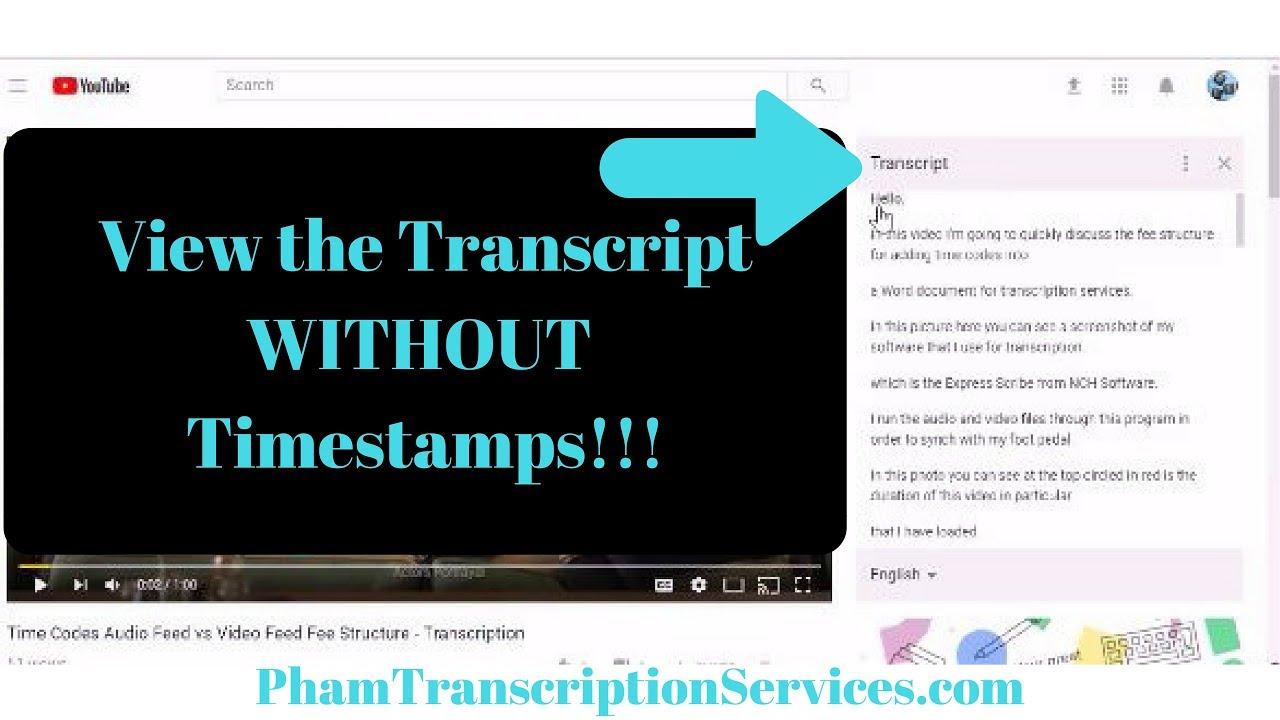
Ever wished you could grab the exact words from a YouTube video without replaying it a dozen times? Whether you’re a student taking notes, a content creator researching ideas, or just someone who prefers reading over rewinding, video transcripts can be a game-changer. the good news? YouTube holds the key—you just need to know where to look.
In this guide, we’ll walk you through simple, foolproof ways to extract transcripts from any YouTube video—no tech wizardry required. Say goodbye to frantic rewinds adn hello to effortless note-taking. Ready to unlock the hidden text behind your favorite videos? Let’s dive in.
Unveiling the Secrets of YouTube Transcripts
Have you ever wanted to extract the exact words from a YouTube video but didn’t know where to start? YouTube transcripts are a treasure trove of information, offering a writen version of everything spoken in a video. Whether you’re a content creator, researcher, or language learner, accessing these transcripts can save you time and effort. Surprisingly, YouTube automatically generates captions for most videos, even if they’re not manually added by the uploader. These transcripts can be easily retrieved with just a few clicks or by using simple tools. Here’s why they’re invaluable:
- Accurate references: Perfect for quoting or citing video content in your work.
- Improved accessibility: Makes videos more inclusive for those with hearing impairments.
- Enhanced learning: Helps non-native speakers understand the content better.
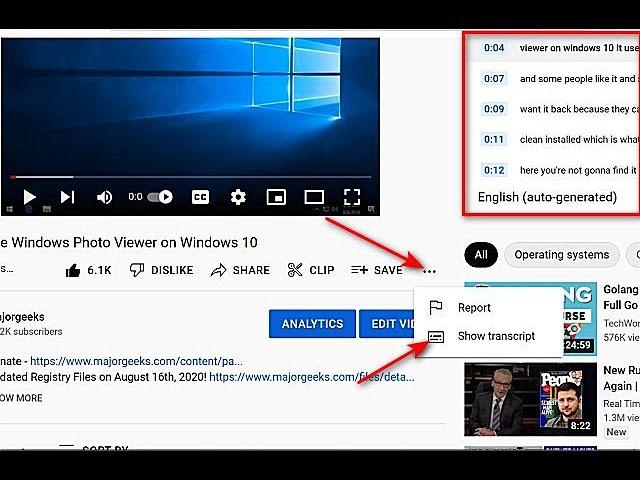
If you’re wondering how to access these transcripts, the process is straightforward. On the YouTube video page, click the three dots below the video and select “Show transcript”. For more advanced needs, tools like third-party websites or browser extensions can automate the process and provide downloadable versions. Here’s a swift comparison of popular methods:
| Method | Ease of Use | Export Options |
|---|---|---|
| YouTube’s built-in transcript | Simple | Copy-paste only |
| Third-party tools | Moderate | Download as TXT or SRT |
| Browser extensions | Easy | Direct download |
Exploring Simple Tools for Instant Video Transcriptions
Turning YouTube videos into text doesn’t have to be intricate. With a few effortless tools, you can extract transcripts in seconds.Whether you’re a content creator, student, or researcher, these methods save time and enhance productivity. Here’s how:
- YouTube’s built-in transcript feature: Simply open the video, click the three dots below the player, and select “Show transcript.”
- Third-party tools: Platforms like Otter.ai or Descript offer seamless transcription with additional editing capabilities.
- Google Docs voice Typing: Play the video and use Google Docs’ voice typing feature to transcribe it live.
For those who prefer structured workflows, here’s a quick comparison of popular tools:
| Tool | Ease of Use | Accuracy |
|---|---|---|
| YouTube transcript | High | Good |
| Otter.ai | medium | Excellent |
| Google Docs | Low | Moderate |
Exploring these options allows you to unlock YouTube’s potential, transforming spoken content into written material with minimal effort. Choose the tool that best fits your needs and start transcribing today!
Maximizing Efficiency with Automated Transcript Extraction
Harnessing the power of automated transcript extraction can transform how you engage with YouTube content. Whether you’re a content creator, researcher, or casual viewer, having easy access to video transcripts unlocks a wealth of possibilities. With tools that streamline the process, you no longer need to manually transcribe or rely on inconsistent captions. Rather, you can effortlessly extract text for:
- Content Repurposing: convert video scripts into blogs, social media posts, or eBooks.
- SEO Optimization: Use transcripts to enhance search engine visibility and accessibility.
- language Translation: Translate transcripts to reach a global audience.
| Benefit | Use Case |
|---|---|
| Time Savings | extract transcripts in seconds instead of hours. |
| Accuracy | Ensure correct text portrayal without errors. |
| Flexibility | Export transcripts in multiple formats (TXT, SRT, DOCX). |
By integrating these methods into your workflow, you can focus on creativity rather than manual tasks. Automated transcript extraction not only boosts productivity but also opens doors to innovative ways of utilizing video content. embrace this technology to make your YouTube experience more efficient and impactful.
Enhancing Accessibility and Learning with Accurate Captions
Accurate captions are more than just a convenience—they are a gateway to inclusivity and deeper understanding. By leveraging YouTube’s transcript feature, users can transform video content into accessible text, making it easier for individuals with hearing impairments to engage. Additionally, transcripts serve as a powerful tool for learners, allowing them to review, highlight, and study key points at their own pace. Whether you’re a student, educator, or casual viewer, this capability ensures no detail is missed and promotes a more inclusive digital experience.
Here’s how you can unlock this feature seamlessly:
- Navigate to the video: Open the YouTube video you want to transcribe.
- Access the transcript: Click on the three dots below the video and select “Show transcript.”
- copy and save: Highlight the text, copy it, and paste it into your preferred document or note-taking app.
| Step | Action |
|---|---|
| 1 | Open the desired YouTube video. |
| 2 | Click on the three dots below the video. |
| 3 | Select “Show transcript” and copy the text. |
This simple process not only enhances accessibility but also empowers users to create study aids, reference materials, or even repurpose content for blogs and presentations.By making video content more adaptable, YouTube transcripts bridge the gap between passive viewing and active learning.
wrapping up
Outro:
And there you have it—unlocking YouTube’s hidden transcripts is easier than you think! Whether you’re researching, studying, or just want to revisit key moments without replaying the entire video, these simple methods put the power of text at your fingertips.
now, go ahead—grab those transcripts, save time, and make YouTube work even smarter for you. Happy transcribing! 🚀
(Want more tech tips? Stay tuned for our next guide!)