
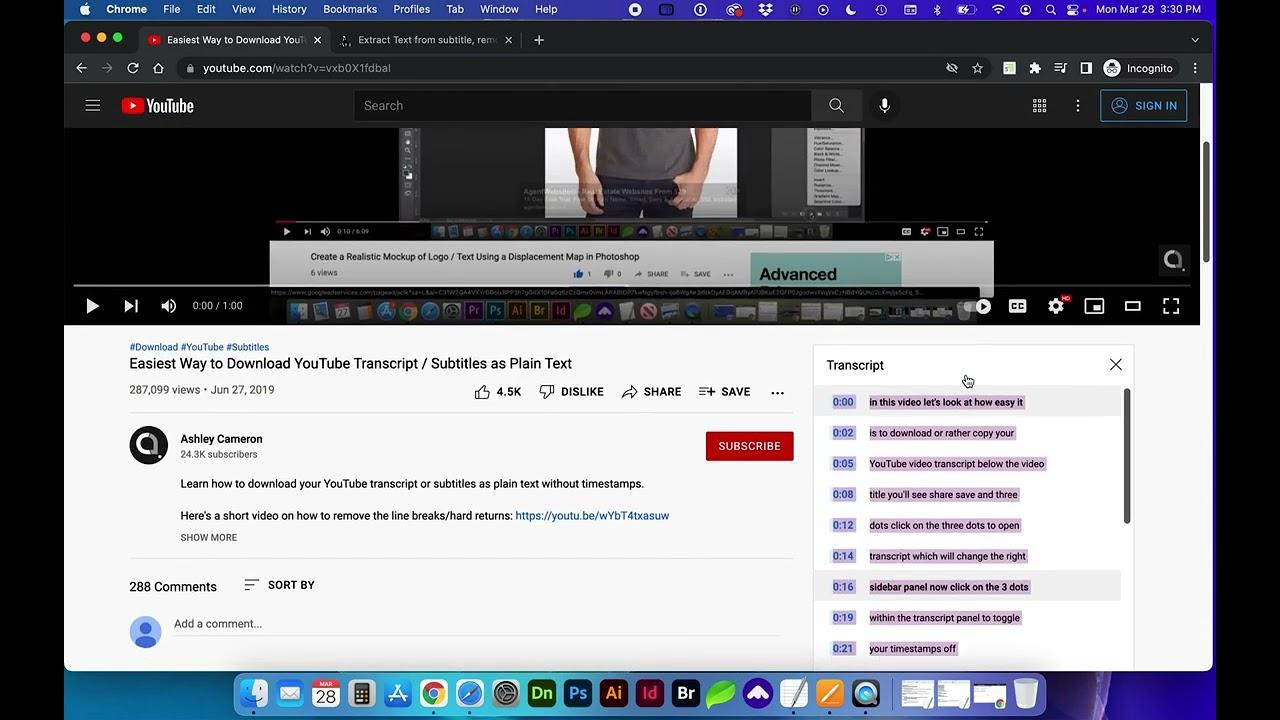
In a world where videos dominate our screens, the desire to capture and revisit their spoken content has never been greater.Whether you’re a researcher hunting for quotes, a student reviewing lecture material, or simply someone who prefers reading over watching, YouTube transcripts offer a hidden treasure trove of information. Yet, unlocking these transcripts can feel like deciphering a cryptic code—until now. Welcome to a simple, step-by-step guide that demystifies the process, empowering you to access and utilize YouTube’s untapped textual resources with ease. Ready to turn spoken words into written gold? Let’s dive in.
Understanding the Importance of YouTube Transcripts
YouTube transcripts are more than just a text version of your video content—they are a powerful tool for accessibility, SEO, and audience engagement. By providing a written record of your video’s dialog, you make your content accessible to viewers who are deaf or hard of hearing, while also catering to those who prefer reading over watching. Additionally, transcripts allow search engines to better index your content, improving your video’s discoverability and ranking. This dual benefit ensures your content reaches a wider audience while staying inclusive.
| Benefit | Impact |
|---|---|
| Accessibility | Makes content inclusive for all viewers. |
| SEO Enhancement | Boosts search engine rankings. |
| engagement | Encourages longer watch times. |
Moreover, transcripts can enhance viewer engagement by allowing users to quickly skim through content or revisit specific sections without rewatching the entire video.this is especially useful for tutorials, educational content, or lengthy discussions. Transcriptions also serve as a valuable resource for repurposing content into blog posts, social media snippets, or eBooks, maximizing your efforts. by integrating transcripts into your YouTube strategy, you create a more versatile and impactful content experience for your audience.
Exploring Tools and Methods for Transcript Extraction
Extracting transcripts from YouTube videos has never been easier, whether you’re a content creator, researcher, or just someone looking to repurpose valuable information. With the right tools, you can quickly convert spoken words into editable text, making it perfect for blog posts, subtitles, or study notes. Here are some popular methods to get started:
- Manual Copy-Paste: youtube’s built-in transcript feature allows you to copy text directly from the video description.
- Automated Tools: Browser extensions like Transcript Hunter or websites such as DownSub simplify the process with one-click downloads.
- Google Docs Voice Typing: Play the video and let Google Docs transcribe it in real-time—ideal for accuracy.
| Method | Best For | Speed |
|---|---|---|
| Manual Copy | Short videos | Slow |
| automated Tools | Bulk extraction | fast |
| Google Docs | High accuracy | Medium |
For those who prefer a hands-off approach, third-party software like Descript or Otter.ai offers advanced features such as timestamp synchronization and speaker identification. Meanwhile, developers can leverage YouTube’s API for custom solutions, enabling batch processing of multiple videos. No matter your skill level, there’s a method tailored to your needs—just pick the one that fits your workflow!
Step by Step Guide to Accessing Transcripts on YouTube
Accessing transcripts on YouTube might seem daunting, but it’s actually a straightforward process. Whether you’re looking to review spoken content or translate it into another language, YouTube’s built-in transcription feature is incredibly useful. Here’s how you can unlock it:
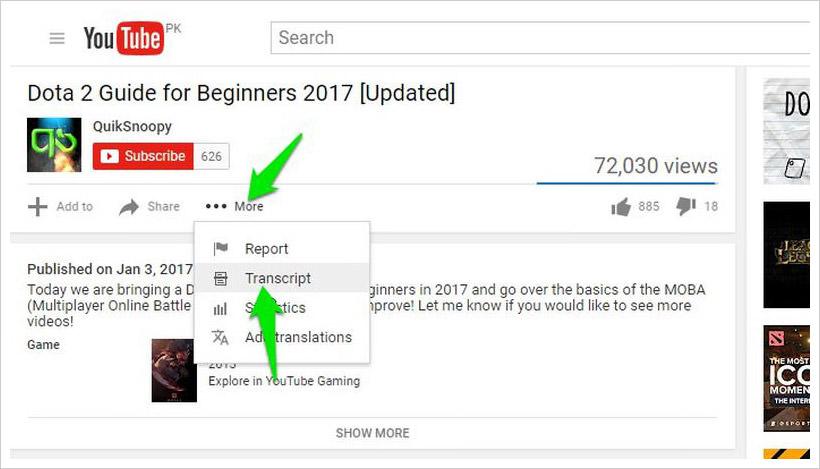
- Navigate to the video: Open the YouTube video you want to access transcripts for.
- Click the ellipsis (•••): Located below the video, this menu offers additional options.
- select “Show transcript”: This will display the transcript panel on the right side of the screen.
- Adjust the settings: Use the toggle button to enable or disable timestamps as needed.
For those who prefer a more visual guide,here’s a swift reference table to simplify the process:
| Step | Action |
|---|---|
| 1 | Open the desired YouTube video. |
| 2 | Click the ellipsis (•••) menu. |
| 3 | Choose “Show transcript” from the dropdown. |
| 4 | Customize timestamps if needed. |
Optimizing Transcripts for Search and Accessibility
YouTube transcripts are a goldmine for enhancing both search engine optimization (SEO) and accessibility. By structuring your transcripts effectively, you can make your content more discoverable and user-friendly. Start by ensuring accuracy: double-check automated transcripts for errors, as search engines prioritize precise content. Break the transcript into logical sections with headers, making it easier for users to skim and for search engines to index. Additionally, incorporate relevant keywords naturally to boost visibility without compromising readability.
Accessibility is equally crucial when optimizing transcripts. Use
- elements to list key points or highlights, ensuring screen readers can interpret the content seamlessly. Here’s a quick WordPress-styled table to summarize best practices:
- Blog posts—expand on ideas mentioned in the video.
- Social media snippets—highlight key takeaways for quick engagement.
- Email newsletters—summarize video content for subscribers.
- Use reliable tools for editing transcripts, such as YouTube’s built-in editor or third-party software.
- Break transcripts into segments based on topics or timestamps to improve readability.
- Proofread thoroughly to catch errors and ensure the text aligns with the audio.
| Task | Action |
|---|---|
| Keyword Integration | Use keywords in a natural,context-rich manner. |
| Section Headings | break transcripts into clear, labeled sections. |
| Bullet Points | Highlight key takeaways for easy scanning. |
By following these steps, you’ll not only improve your video’s search ranking but also create a more inclusive experience for all viewers.
Practical Tips for Using Transcripts to Enhance Content Creation
Using YouTube transcripts can revolutionize your content creation process, offering a treasure trove of ideas and insights. Start by extracting transcriptions directly from youtube or using third-party tools for greater flexibility. Once you have the text, analyze key phrases and recurring themes to identify what resonates with your audience. this helps you craft content that aligns with their interests and solves their problems.
Transform these transcripts into actionable formats such as:
| Use Case | Benefit |
|---|---|
| SEO Optimization | Enhances keyword targeting and search rankings. |
| Content Recycling | Saves time by repurposing existing material. |
| Audience Insights | Identifies what topics engage viewers most. |
Common Challenges and Solutions in Transcript Management
Managing transcripts can sometimes feel like navigating a maze, especially when dealing with platforms like YouTube. One common challenge is inaccurate auto-generated captions,which can misinterpret spoken words or miss nuances entirely. Another hurdle is organizing long transcripts into digestible sections, making it easier for readers to follow along. Additionally, editing and formatting transcripts can be time-consuming, especially when ensuring consistency and readability.
Here are some practical solutions to tackle these issues:
| Challenge | Solution |
|---|---|
| Inaccurate captions | Manually review and edit auto-generated text |
| Disorganized content | Divide transcripts into labeled sections |
| Time-consuming editing | Use tools with bulk editing features |
Future Outlook
Outro: Unlock the Power of Words
And there you have it—unlocking YouTube transcripts is easier than you think! Whether you’re a content creator, researcher, or just someone who loves digging deeper into videos, these simple steps put the power of transcripts right at your fingertips.
Now,go ahead—copy,analyze,or repurpose those hidden words. The next great idea might just be waiting in a transcript you haven’t explored yet. Happy transcribing! 🚀
Got any cool tricks for using YouTube transcripts? Drop them in the comments—we’d love to hear from you!
